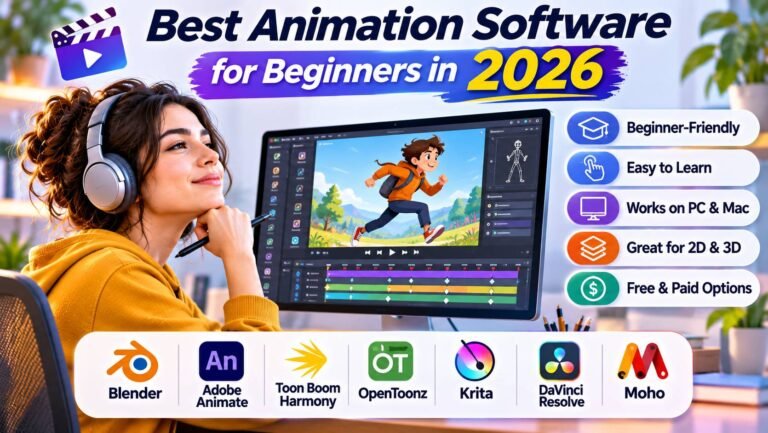
Getting started with animation doesn’t require years of experience or complicated software. Explore the best animation software for beginners in 2026, including easy-to-learn tools for creating 2D animations, 3D characters, cartoons, and motion graphics. Find the right program based on your skills, creative goals, budget, and computer setup.
You have an idea for a cartoon, a YouTube intro, or a short character scene, but a quick search leaves you staring at dozens of programs and no clear place to start. The short answer: for most beginners, Blender (3D), Krita or Pencil2D (free 2D drawing), and Animaker (template-based videos) are the best animation software to try first.
You do not need expensive professional tools. Choosing the right animation software for beginners can lead somewhere real: the U.S. Bureau of Labor Statistics reports a median annual wage of $102,030 for special effects artists and animators in May 2025, according to its Occupational Outlook Handbook.
The right pick depends on whether you want to draw frame by frame, build 3D characters, or put together animated videos from templates. This guide covers animation software for beginners in 2026, including free and paid options for Windows and Mac.
If you’re looking for a wider selection of tools beyond beginner-friendly options, explore our guide to animation software for PC, which compares animation programs for both PC and Mac users.
What Should Beginners Look for in Animation Software?
Choose a tool that supports your project, not the one with the longest feature list. These things matter most early on:
- An interface that makes sense without reading a manual
- A simple timeline for arranging frames and movement
- Basic drawing and editing tools
- Keyframes, which let you set a start and end position while the software fills in the motion between them
- Templates or ready-made assets if you don’t want to draw everything
- Beginner tutorials and an active community
- Export options such as MP4 or GIF
- Compatibility with your Windows PC or Mac
- A free version or an affordable price
Best Animation Software for Beginners in 2026
Pricing models change, so confirm current details on each official website before you download or buy.
Blender
Best for: Beginners who want to explore 3D animation and character work.
Platform: Windows, macOS, and Linux
Pricing: Free and open-source
Why beginners may like it: Blender combines modeling, rigging, animation, and rendering in one program, and its large community means almost any question has a tutorial. It also includes a 2D drawing tool called Grease Pencil.
Limitation: The interface is dense, so expect a longer learning curve than most tools on this list.
Krita
Best for: Beginners who enjoy drawing and want to try frame-by-frame 2D animation.
Platform: Windows, macOS, and Linux
Pricing: Free and open-source
Why beginners may like it: Krita is a full digital painting program with an animation timeline added. It supports onion skinning, which shows faint copies of previous frames so you can line up each new drawing.
Limitation: Its animation features are simpler than those in dedicated animation programs, so long projects can feel restrictive.
Pencil2D
Best for: Students and hobbyists who want to make simple hand-drawn animations quickly.
Platform: Windows, macOS, and Linux
Pricing: Free and open-source
Why beginners may like it: Pencil2D is lightweight and easy to learn, with a clean layout and basic bitmap and vector drawing tools. It works well for short animated sketches and for understanding how frames fit together.
Limitation: It is intentionally basic, with limited effects and no advanced character rigging.
OpenToonz
Best for: Beginners who want traditional cartoon tools and don’t mind a slower start.
Platform: Windows, macOS, and Linux
Pricing: Free and open-source
Why beginners may like it: OpenToonz is based on Toonz, software used in professional animation production. It gives you a serious 2D toolset at no cost, which makes it a useful stepping stone toward studio-style workflows.
Limitation: The interface can feel crowded, and beginner tutorials are harder to find than for Blender or Krita.
Synfig Studio
Best for: Beginners who want vector cartoons without drawing every frame by hand.
Platform: Windows, macOS, and Linux
Pricing: Free and open-source
Why beginners may like it: Synfig uses vector artwork and tweening, where you set key poses and the program generates the in-between frames. It also supports bone-style rigging for puppet-like characters.
Limitation: Layers, parameters, and bones take time to understand, so the first few projects may feel slow.
Moho
Best for: Beginners who are willing to pay for a dedicated 2D character animation tool.
Platform: Windows and macOS
Pricing: Paid, sold as a one-time purchase rather than a subscription, with a trial available
Why beginners may like it: Moho Debut is aimed at first-time animators and hobbyists. Its vector drawing and bone rigging let characters move without redrawing every frame.
Limitation: There is no free version, and Debut includes fewer features than Moho Pro.
Animaker
Best for: Beginners who want animated videos without drawing.
Platform: Web browser, with an iOS app also available
Pricing: Freemium, with paid subscription plans
Why beginners may like it: Animaker uses drag-and-drop templates, characters, and backgrounds, so you can produce an explainer or social video quickly. Nothing needs to be installed on your computer.
Limitation: The free plan limits premium assets and downloads, and you get less creative control than in traditional animation software.
Which Animation Software Should Beginners Choose?
- Free software: Pencil2D or Krita for 2D, Blender for 3D.
- Drawing cartoons: Start with Pencil2D or Krita. Consider Moho Debut if you want rigging tools and don’t mind paying.
- 3D animation: Blender is the clear starting point, though it takes more learning time.
- Animated videos without drawing: Animaker.
- A professional path: Blender offers the most room to grow, and Moho Pro suits 2D character work.
When Off-the-Shelf Software Is Not Enough
If you’re planning to build a custom animation application rather than use an existing tool, outlining its features, user needs, and technical expectations in a software requirements document can help establish a clear development plan.
Businesses that need specialized animation features, custom creative platforms, or integrations with existing systems may work with a software development and consulting company to plan and build a solution around their requirements.
How to Start Learning Animation Without Feeling Overwhelmed
Start small. A bouncing ball is a classic first project because it teaches timing, spacing, and keyframes in a few seconds of footage. Once the ball feels natural, try moving text, then a simple walking character.
Follow one beginner tutorial at a time, and pick a single program to stick with for a few weeks. Jumping between tools resets your progress. Master the basics of movement and timing first, then explore advanced features as your projects call for them.
Frequently Asked Questions
What is the best animation software for beginners?
Blender is a strong choice for 3D, Krita and Pencil2D for free 2D drawing, and Animaker for template-based videos. The best option depends on your animation style, budget, and goals.
Is there free animation software for beginners?
Yes. Blender, Krita, Pencil2D, OpenToonz, and Synfig Studio are free. With them you can make 2D cartoons, short animated clips, and 3D scenes.
Can beginners learn animation without drawing?
Yes. Template-based tools, motion graphics, 3D programs, and keyframe animation let you create movement without advanced drawing skills.
Is animation difficult to learn?
It depends on the style and software. Simple movement and timing exercises are approachable, and complex character animation can wait until you’re comfortable.
Should beginners use professional animation software?
Only if your goals require it. Professional tools offer more features but also more complexity, so a beginner-friendly program usually makes a better starting point.
Conclusion
The best animation software for beginners depends on your creative goals, computer, budget, and preferred style. Draw with Krita or Pencil2D, build in 3D with Blender, or assemble quick videos with Animaker. Whatever you choose, begin with a small project, practice regularly, and let your skills grow gradually. You can always move to more advanced software later.
Published by Meedium.